Disabling SSE-C Encryption For Amazon S3 Buckets: What to Know for Data Protection and Ransomware Prevention
AWS has adding another secure-by-default change. Starting on April 6th, 2026, AWS has disabled SSE-C by default on all new S3 general purpose buckets and for existing buckets in accounts that do not have any SSE-C encrypted data. AWS's announcement blog can be found here.
In early 2025, we covered how AWS and other security firms reported ransomware via SSE-C encryption as this unique encryption mechanism permits for malicious actors to encrypt data without AWS storing encryption keys. Thus, the data is essentially unrecoverable if access to the encryption key is lost. In 2026, we're now seeing an additional layer of protection added by AWS to help protect against malicious usage of SSE-C encryption.
Note: This does not mean AWS is completely retiring SSE-C. We believe it's possible that AWS may retire this in the future, but as of now - we see it as an additional secure-by-default change and another configuration item to monitor in your cloud environments. As such, we've updated YES3 Scanner, our open-source S3 scanner to now check if buckets have SSE-C encryption disabled.
Let's do a deep-dive into this change on how SSE-C works and how to continue protecting your data in S3.
Using SSE-C Encryption
SSE-C encryption is still possible. However, it may take another step to make encrypting with SSE-C a 2-step process:
- (NEW Step) Unblock SSE-C encryption at the bucket-level via s3:PutBucketEncryption.
- Encrypt objects in the bucket with SSE-C encryption.
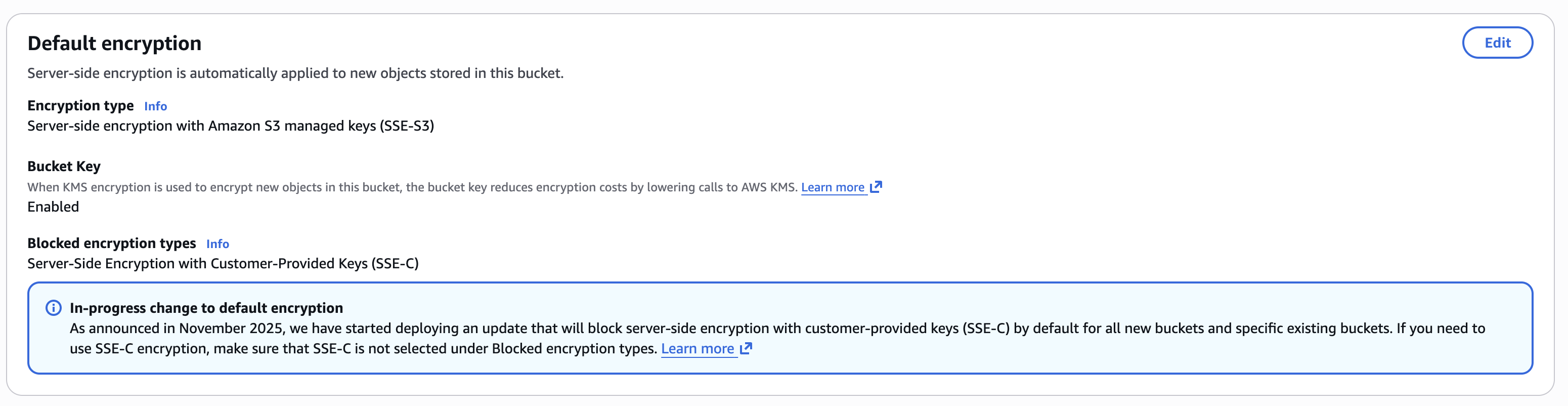
For any new S3 buckets, SSE-C will be disabled by default. AWS will also disable SSE-C for existing buckets that do not have any SSE-C encrypted data.
How is Disabling and Enabling SSE-C Encryption Managed?
AWS added this setting within the S3 bucket's existing bucket encryption settings. Thus, there are no additional IAM permissions or API actions.
This is done via the existing PutBucketEncryption API via the new BlockedEncryptionTypes bucket-level setting where SSE-C can be specified.
Thus, an example command to disable SSE-C encryption is via the CLI command below to set "BlockedEncryptionTypes"
aws s3api put-bucket-encryption \
--bucket FOG-SAMPLE-BUCKET \
--server-side-encryption-configuration '{"Rules": [{"BlockedEncryptionTypes": {"EncryptionType": ["SSE-C"]}}]}'
This is governed by the s3:PutEncryptionConfiguration IAM Action.
Note: use caution when disabling SSE-C encryption on buckets. We found that even if our bucket had objects stored with SSE-C encryption, we could still set SSE-C encryption to disabled. Thus if there were valid use cases for SSE-C encryption, this could break existing workflows.
SSE-C Encryption and What This Means for SSE-C Ransomware
We have covered SSE-C ransomware in a previous post. At a high level, attackers were encrypting existing data with SSE-C encryption, an unique form of S3 encryption where the attacker always maintains access of the encrpytion key. Without access to the encryption key, data access is lost.
For an attacker attempting ransomware with SSE-C, this means if a bucket has SSE-C encryption blocked - they will need to first unblock SSE-C encryption at the bucket level. A theoretical SSE-C ransomware attack will consist of the following 2 steps:
- Change Bucket Encryption for Blocked Encryption to None
- Encrypt Objects with SSE-C.
Thus, we recommend ensuring your detection systems alerts on bucket encryption changes.
Detection for Enabling SSE-C Encryption
In CloudTrail, we now will look for PutBucketEncryption events. Now that SSE-C ransomware can take 2 distinct steps (one of which is a management event), ransomware can be detected sooner. We previously wrote about how to detect ransomware in AWS in S3. SSE-C ransomware prior to this change would require alerting on S3 data events (such as copy) which are not logged by default and require additional setup.
Here, we'll go into detail how you can detect for a malicious actor modifying SSE-C settings in your AWS environments.
An example call to remove the block on SSE-C encryption for the bucket is as follows:
aws s3api put-bucket-encryption \
--bucket FOG-SAMPLE-BUCKET \
--server-side-encryption-configuration '{"Rules": [{"BlockedEncryptionTypes": {"EncryptionType": ["NONE"]}}]}'If SSE-C is disabled for buckets, you can monitor for PutBucketEncyption events in CloudTrail. Specifically, if SSE-C is enabled in the call, we see it in the CloudTrail event record:

We also recommend scanning buckets for buckets that do not have SSE-C disabled. This can be done either via the S3 GetBucketEncryption API. We've also updated our open source YES3 Scanner to scan for S3 buckets that do not have SSE-C encryption disabled.
Preventing SSE-C Enablement
Previously we covered how to prevent SSE-C Encryption here and here.
We still recommend using SCPs and RCPs to prevent SSE-C Enablement. Additionally, bucket policies can be used for more targeted enforcement.
However, there's no way to use SCPs or RCPs currently to deny unblocking SSE-C encryption due to lack of support for the appropriate condition keys. (As of January 7th, 2025). Additionally, Declarative Policies don't currently support S3. If you would like to deny changing bucket encryption completely, the following policy can be used.
Our wishlist for AWS is either to expand declarative policies to cover S3 or to add additional condition keys so that we can deny unblocking SSE-C encryption. If AWS expands BlockedEncyptionTypes (such as to enforce KMS encryption), we expect to see potentially more features there.
In the interim, we can block changing bucket encryption if we've already disabled SSE-C encryption.
Bucket Policies can also be used to prevent changing bucket encryption and thus enabling SSE-C encryption on the bucket (assuming SSE-C is disabled)
{
    "Version": "2012-10-17",
    "Statement": [
        {
            "Sid": "DenyBucketEncryptionChange",
            "Effect": "Deny",
            "Principal": {
                "AWS": "*"
            },
            "Action": "s3:PutEncryptionConfiguration",
            "Resource": "arn:aws:s3:::FOG-SECURITY-BUCKET"
        }
    ]
}
This can be combined with the additional layer of preventing writing any object with SSE-C encryption. Thus, this prevents a malicious actor from disabling SSE-C encryption at the bucket-level and prevents them from writing objects encrypted with SSE-C.
{
	"Version": "2012-10-17",
	"Statement": [
		{
			"Sid": "Statement1",
			"Effect": "Deny",
			"Principal": {
				"AWS": "*"
			},
			"Action": "s3:PutEncryptionConfiguration",
			"Resource": "arn:aws:s3:::FOG-SECURITY-BUCKET"
		},
		{
            "Sid": "DenySSEC",
            "Effect": "Deny",
            "Principal": "*",
            "Action": [
            	"s3:PutObject"
            ],
            "Resource": "arn:aws:s3:::FOG-SECURITY-BUCKET/*",
            "Condition": {
        		"Null": {
          			"s3:x-amz-server-side-encryption-customer-algorithm": "false"
        		}
      		}
        }
	]
}
Since PutEncryptionConfiguration events can be called across account, we recommend using RCPs (Resource Control Policies). An example RCP is as follows:
{
  "Version": "2012-10-17",
  "Statement": [
    {
      "Sid": "PreventChangingBucketEncryption",
      "Effect": "Deny",
      "Principal": "*",
      "Action": "s3:PutEncryptionConfiguration",
      "Resource": "*"
    }
  ]
}
If a Service Control Policy (SCP) is desired, see the following:
{
	"Version": "2012-10-17",
	"Statement": [
		{
			"Sid": "PreventBucketEncryptionChange",
			"Effect": "Deny",
			"Action": "s3:PutEncryptionConfiguration",
			"Resource": "*"
		}
	]
}
Conditions in both RCPs and SCPs can be used to account for edge cases such as administrator access or exception use cases (such as legacy buckets). We recommend revisiting our previous research to determine how best to use AWS native features to protect against ransomware and malicious encryption in S3.
Recommendations
If SSE-C is not needed, we recommend the following:
- SSE-C may be disabled by default by AWS.
- Scanning your S3 buckets to ensure SSE-C is blocked.
- Use RCPs and SCPs to limit SSE-C and to limit enabling SSE-C.
- Monitoring CloudTrail for Bucket SSE-C encryption enablement.
As previously noted, our wishlist for AWS includes either additional conditions for s3:PutEncryptionConfiguration so we can more effectively deny enabling SSE-C encryption or for S3 support within declarative policies.
Reach out to us at info@fogsecurity.io if you have questions or if you would like to continue the conversation about how to protect your data in cloud.
References
- https://www.fogsecurity.io/blog/how-to-detect-amazon-s3-ransomware
- https://www.fogsecurity.io/blog/the-complete-guide-to-ransomware-protection-in-s3-and-kms
- https://www.fogsecurity.io/blog/ransomware-in-aws-s3-sse-c
- https://aws.amazon.com/about-aws/whats-new/2026/04/s3-default-bucket-security-setting/
- https://aws.amazon.com/blogs/storage/advanced-notice-amazon-s3-to-disable-the-use-of-sse-c-encryption-by-default-for-all-new-buckets-and-select-existing-buckets-in-april-2026/
- https://www.fogsecurity.io/blog/yes3-amazon-s3
- https://github.com/FogSecurity/yes3-scanner
